New in 3.3

ECHO ORB ECHORB

AGENTIC CODING LOOPS

Your AI coding team, in one window.

Orchestrate a whole team of AI coding agents from one place, with you in the loop. 3.3 gives the whole app a fresh look.

60-day free trial, no credit card. $10/month after. See what's new
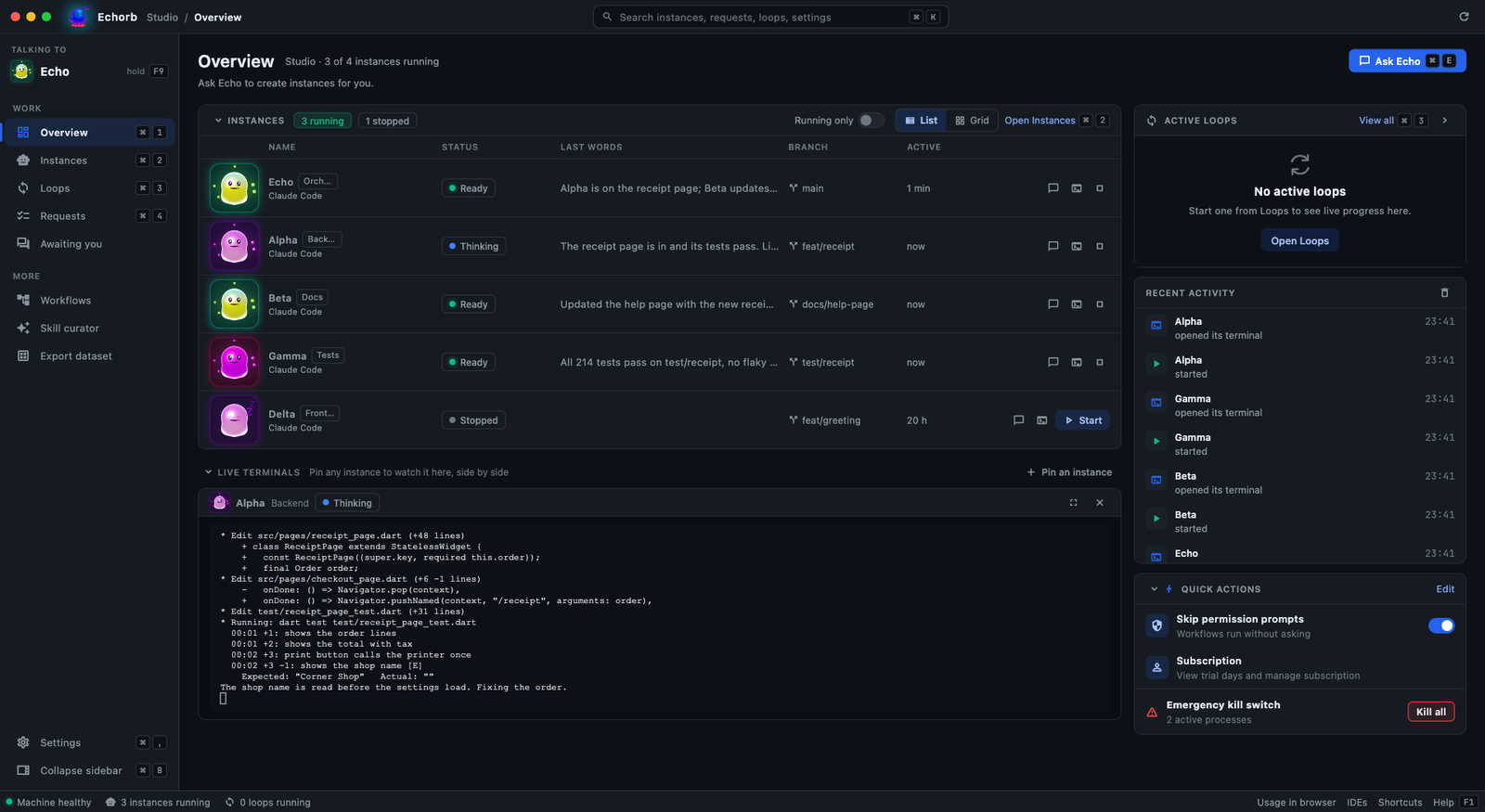
The Echorb Overview page: the instances list with each instance, its role and its state, the live terminal of one instance and the recent activity
Echorb, your AI coding orb

● Release · v3.3 · out now
A fresh look for the whole desktop app, a smarter Spec-Driven hand-off, and many quality-of-life fixes. Fully backwards compatible.

A redesigned app

Main pages and dialogs follow the new design, in the Original and Terminal themes.

Spec-Driven hand-off

Choose who writes the build spec. Echorb checks that nothing you approved was dropped.

Overview and Instances

Running only switches, folding sections, and terminals you can drag into any order.

A redesigned phone app

A new Home, loops in plain words, and delivery status on every message.

Graph Mode is an early preview and ships switched off: turn it on per user under Settings, Agents, Loop Modes. Pair a phone under Settings, Mobile. Built-in providers remain Claude Code and Codex; OpenCode plugs in as a custom provider. The knowledge graph and voice remain optional, off by default, and stay on your machine. The AI coding agents connect to your chosen model provider to run. See Terms for details.

Five ways to point AI at your code

Alongside the original RALPH loop, four autonomous modes, each a different way to go from intent to verified work. Five modes, equal footing. Echorb does the work and you stay in control: you see every step and decide what moves on.

The autonomous loop that drives a spec to done with fresh-context workers, start, pause, resume, stop.

Watch the RALPH run sample on YouTube (31 s)

Turn a one-line idea into a reviewed plan, requirements, design and tasks, before a single line of code. New in 3.3: at the Tasks step, choose who writes the build spec. The mode’s own coordinator writes it, and Echorb checks that nothing you approved was dropped. The standard conversion is still one click away.

Watch the Spec-Driven hand-off sample on YouTube (17 s)

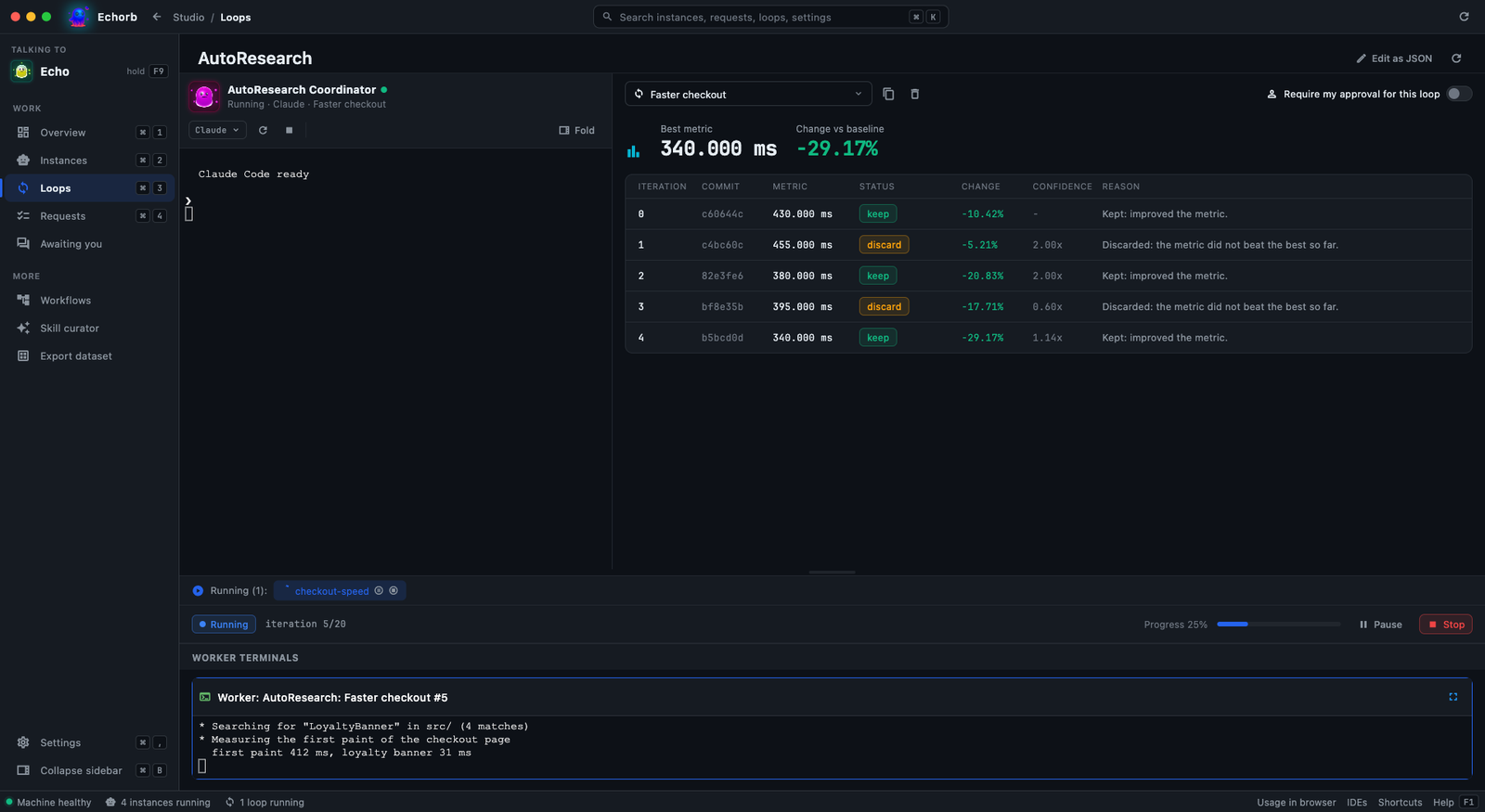
Chase a measurable target: try an idea, measure, keep what improves the number, revert what doesn’t.

The AutoResearch page mid-run: best metric 340 ms, down about 29 percent against the baseline, and a table of iterations marked keep or discard

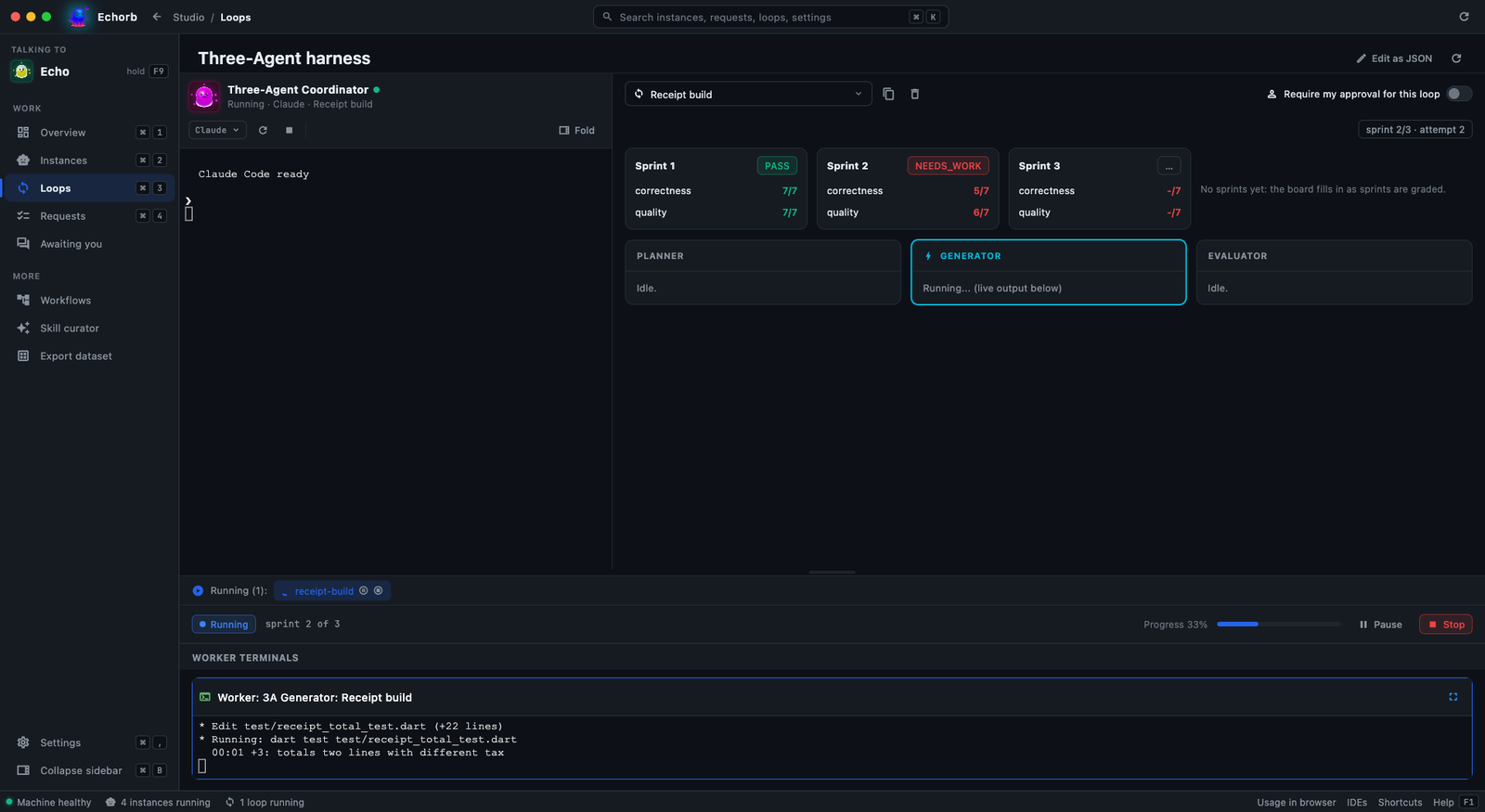
One agent builds; an independent reviewer grades each step against your criteria and sends it back until it passes.

The Three-Agent harness page mid-run: sprint cards graded Pass and Needs work, and the Planner, Generator and Evaluator panes

Describe the work and the repository to the Graph Coordinator and it proposes a graph of parallel worker nodes, put on the board for you. Then watch it run. Graph is an early preview and switched off by default: turn it on per user under Settings, Agents, Loop Modes.

Watch the Graph run sample on YouTube (23 s)

Give your project a brain

A private, per-project knowledge graph built from your codebase. Local and private, off by default.

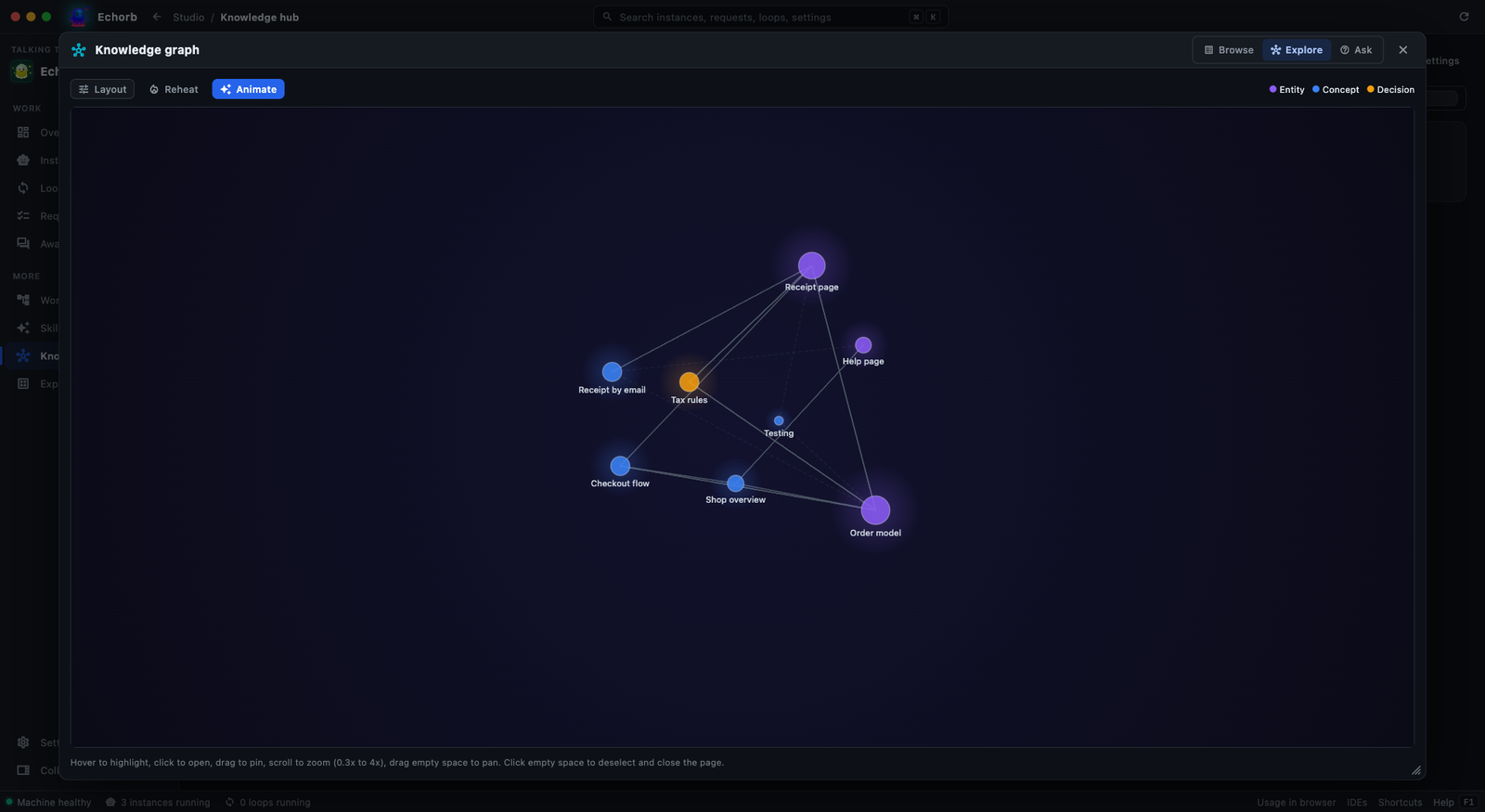
The Echorb knowledge graph as a 3D constellation: linked nodes for the receipt page, order model, tax rules, help page and more

Explore your project as a constellation of linked notes

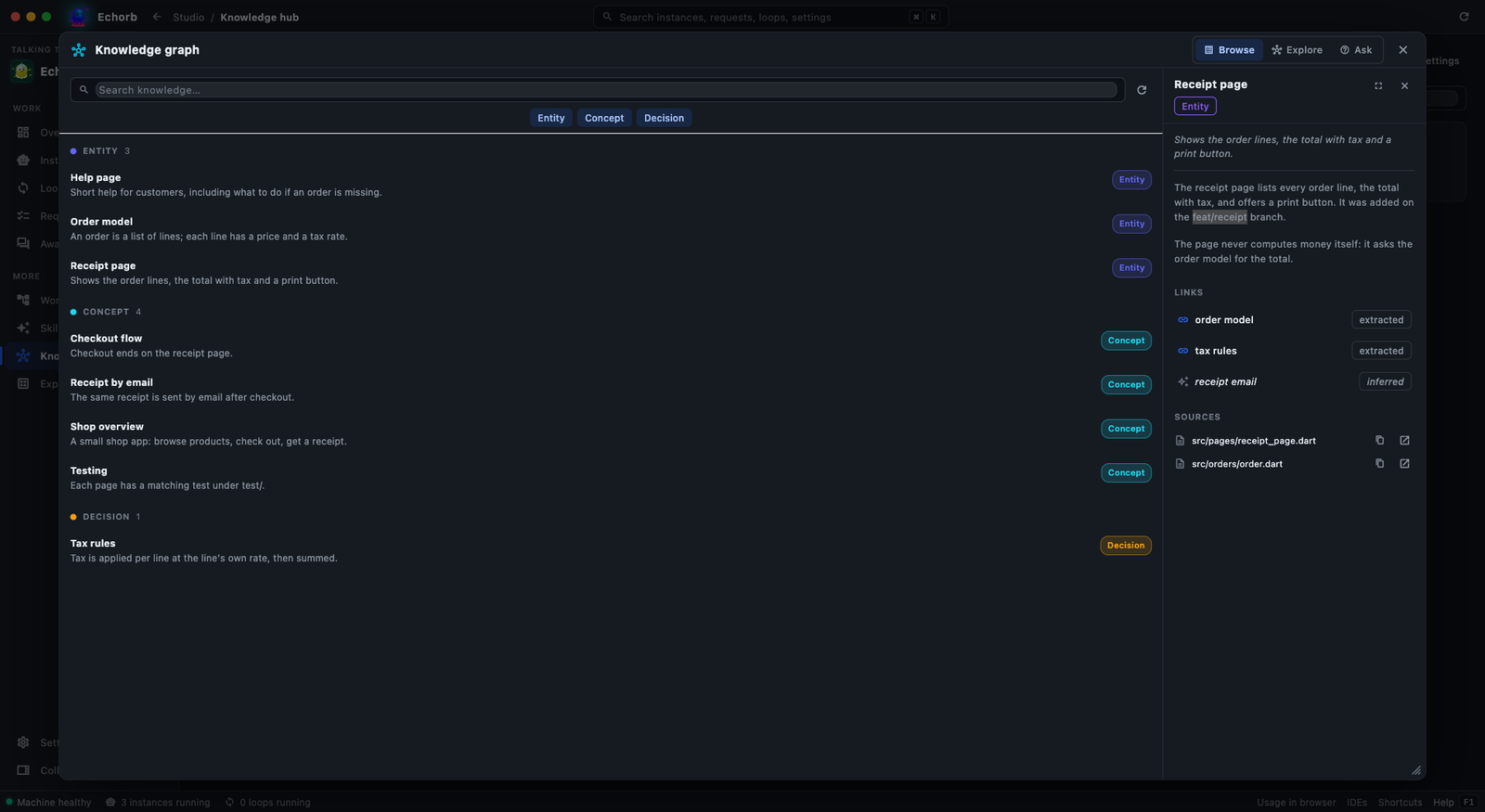
The knowledge graph wiki: a list of entities, concepts and decisions, with the Receipt page open showing its links and sources

Browse a cross-linked wiki, with links and sources for every page

Build a wiki. Echorb maps your project into linked pages, entities, concepts and decisions you can browse and cross-reference.

Ask it anything. Pose a question in plain language and get an answer grounded in your actual files, every claim cited.

One team, on desktop and phone

The Echorb Android companion app, version 1.2.0, pairs with the desktop over your local network. See every instance and its state, and answer permission prompts from the couch, the kitchen, or the other office.

Echorb Overview on the desktop: every instance and its state
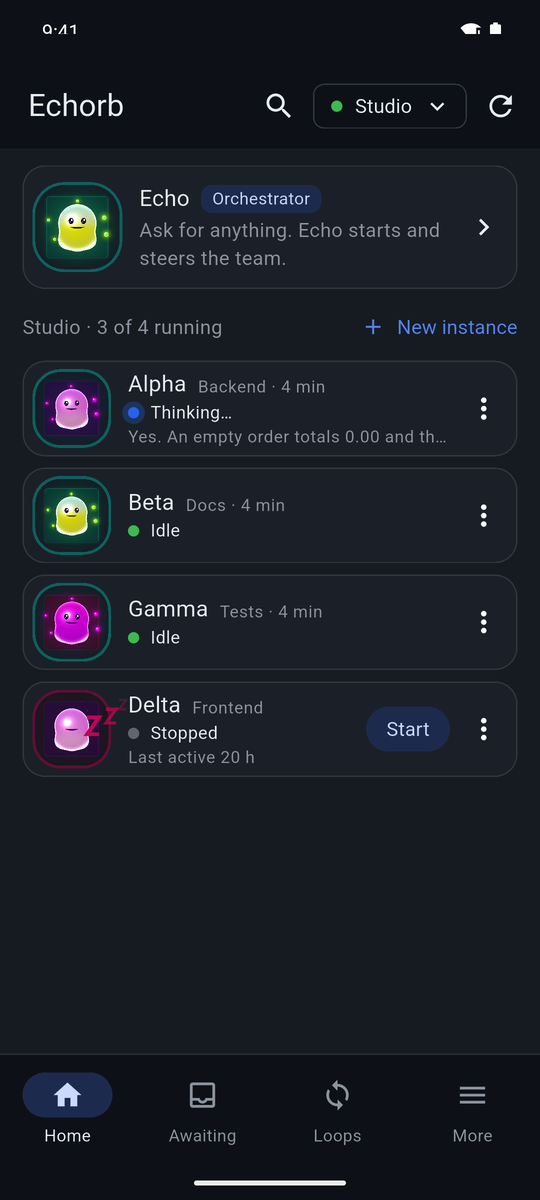
Echorb Android companion app, Home, connected to Studio: the Echo card, then Alpha thinking, Beta and Gamma idle, Delta stopped
Desktop · OverviewEvery instance and its state in one list.
Phone · HomeThe same team, on your phone.
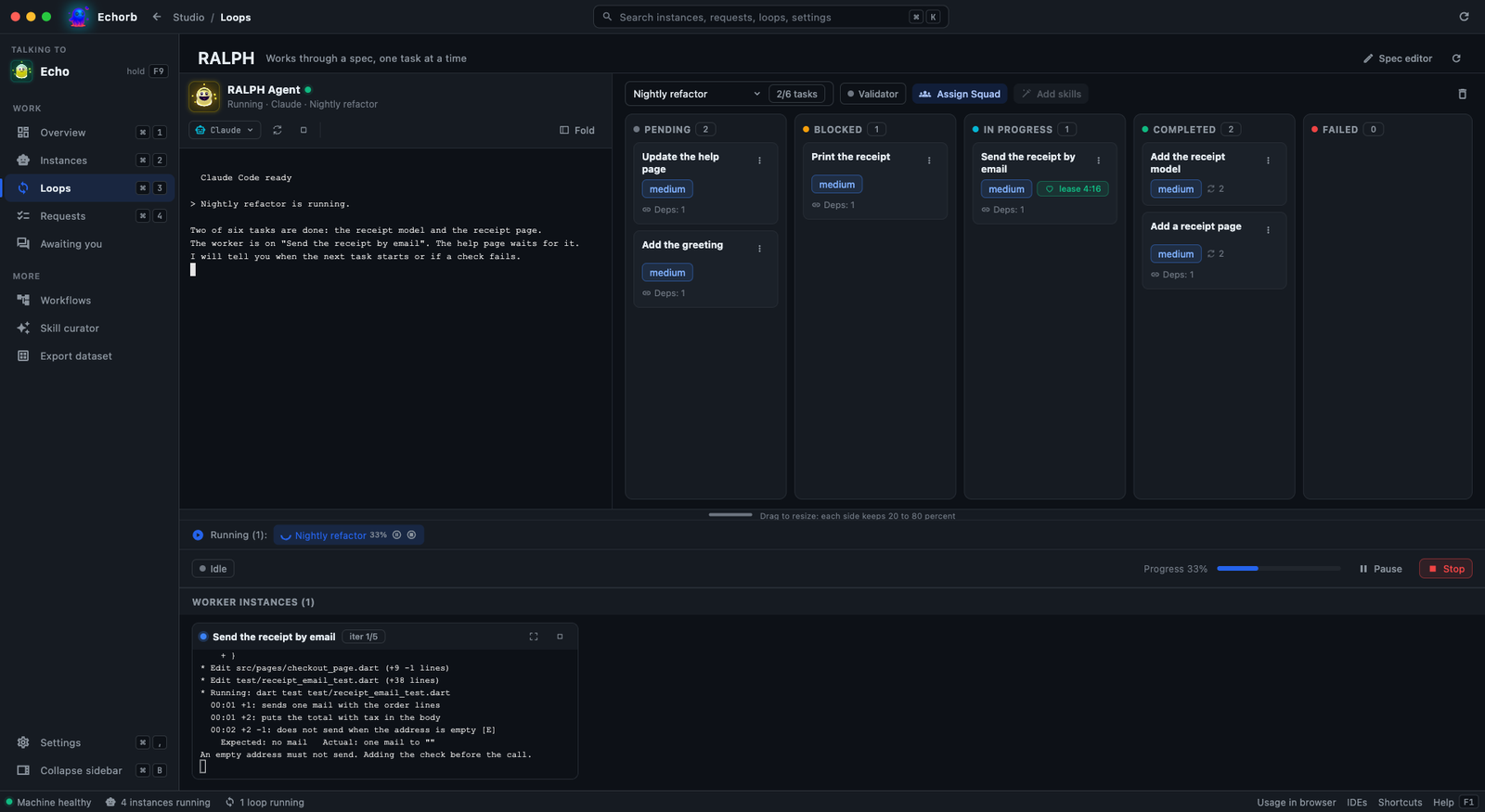
Echorb RALPH page mid-run: the board with Pending, Blocked, In progress, Completed and Failed, and one worker working
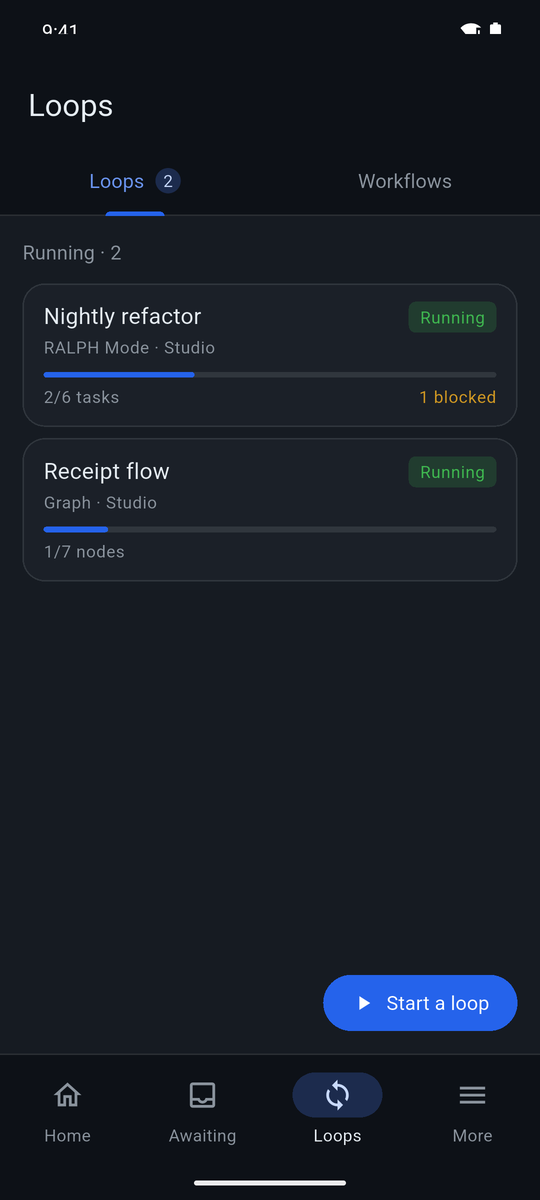
Echorb phone app Loops tab: Nightly refactor, RALPH Mode, 2 of 6 tasks, and Receipt flow, Graph, 1 of 7 nodes
Desktop · RALPHThe board, and the worker doing the task.
Phone · LoopsThe same loops, in plain words.
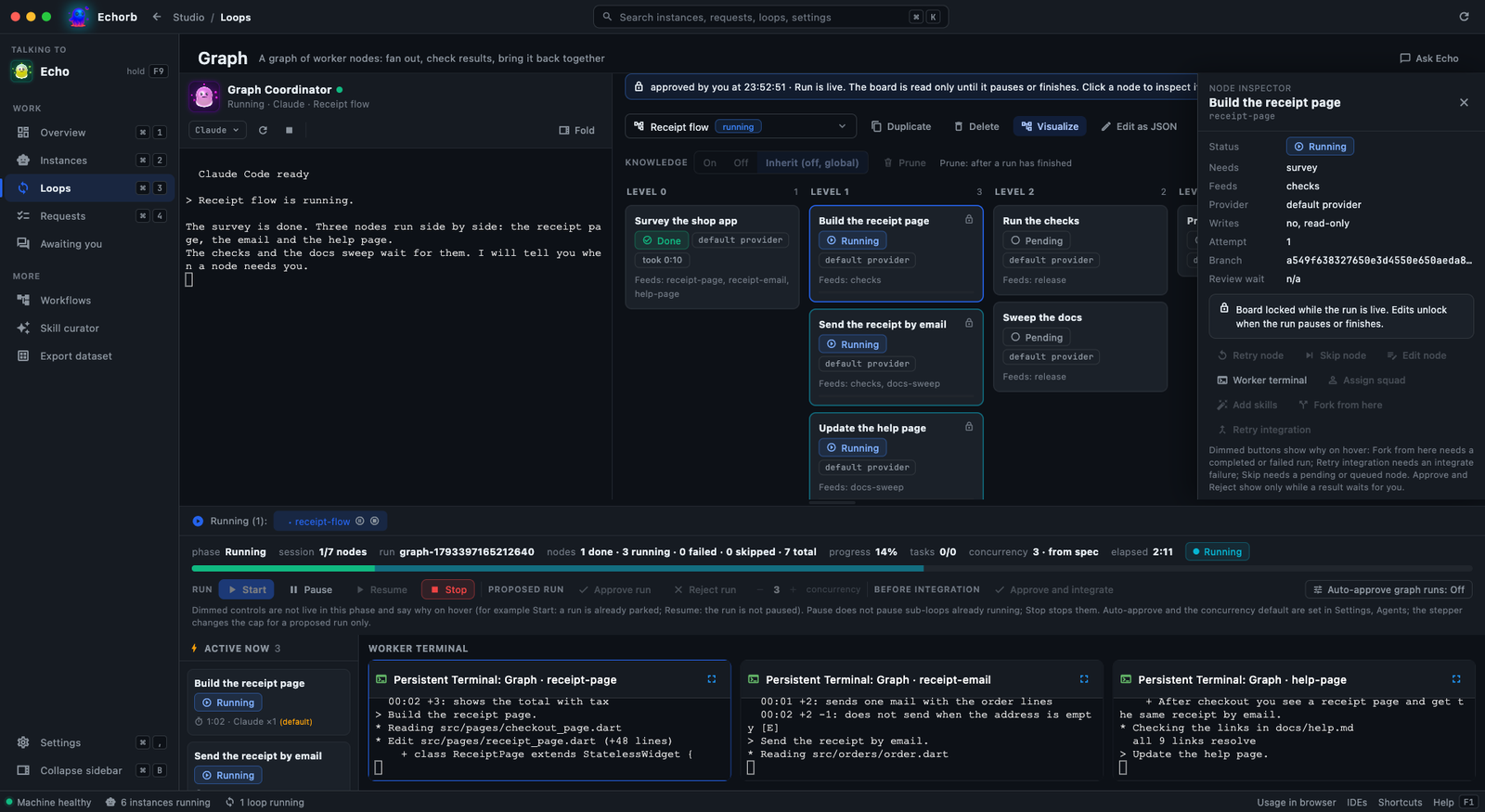
Echorb Graph page mid-run: level lanes of worker nodes, three running side by side
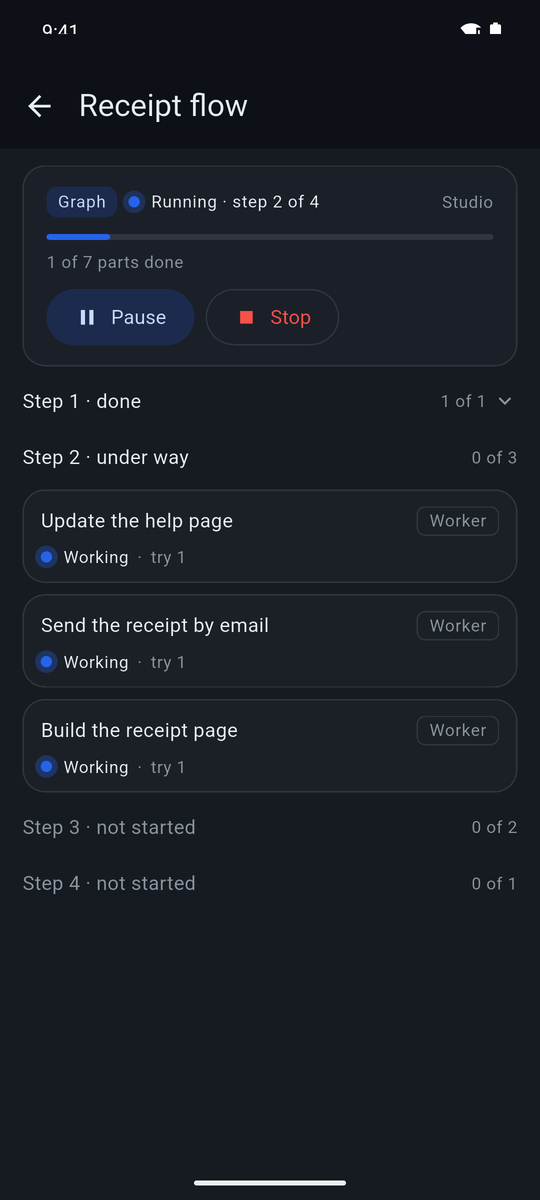
Echorb phone app, Receipt flow: step 2 of 4, 1 of 7 parts done, three workers working, with Pause and Stop
Desktop · GraphNodes running side by side.
Phone · Graph runFollow the steps, pause or stop.
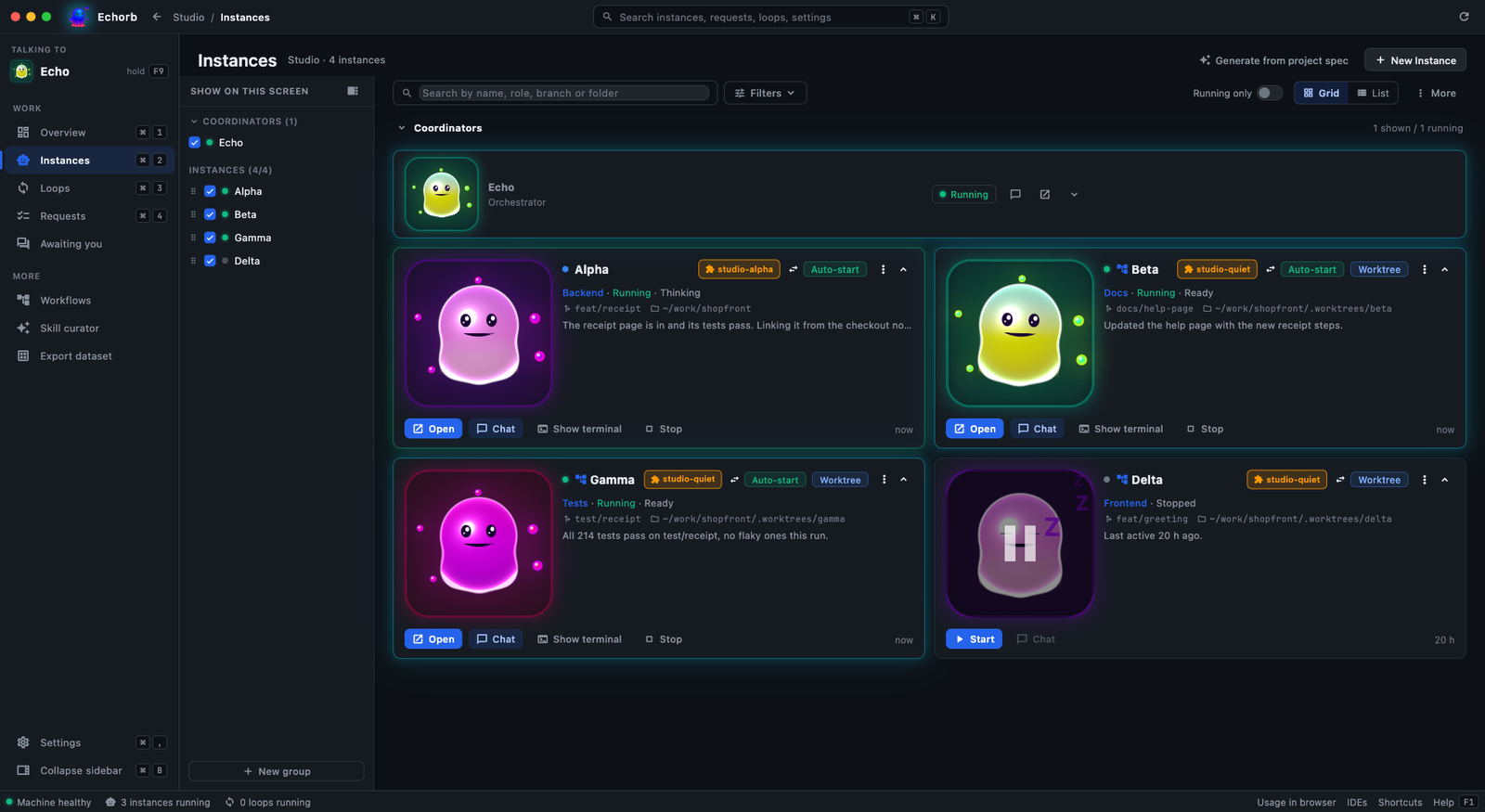
Echorb Instances page as a grid of cards with role, state, branch and folder
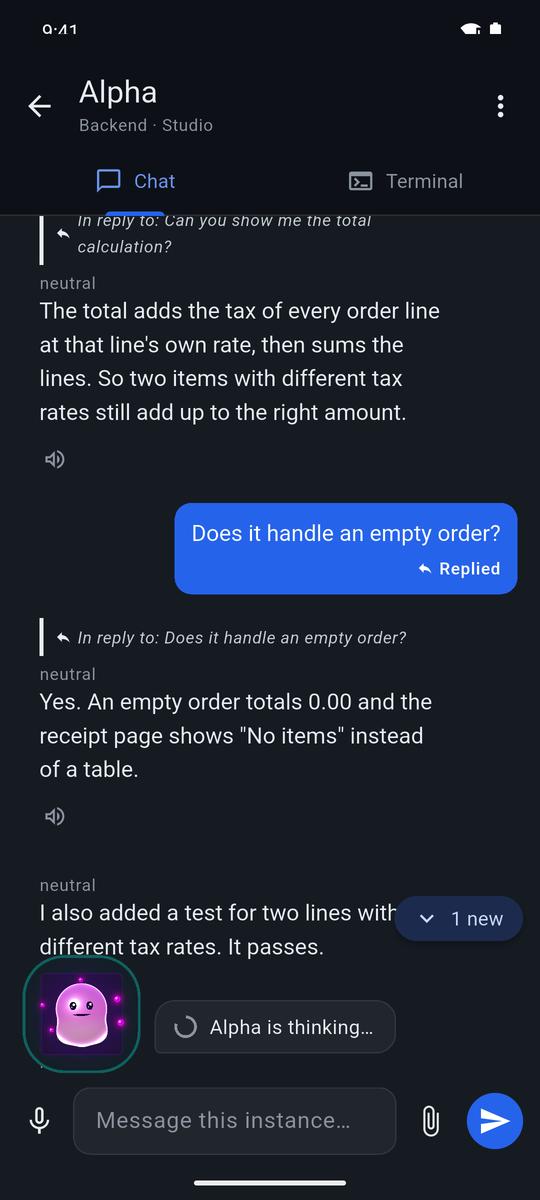
Echorb phone app conversation with Alpha, with a 1 new button
Desktop · InstancesEach instance as a card, in a grid or a list.
Phone · ConversationTalk to any instance, wherever you are.
  • Pair in seconds: Settings, Mobile on the desktop, then scan the QR code or pick the machine from LAN device discovery.
  • Answer permission prompts from the phone: allow once, always allow, or deny with a comment that goes straight back to the agent.
  • Dashboard and servers at a glance: every instance, running or stopped, with its role.
  • Built for your local network: the phone talks to your desktop directly, no cloud relay. Away from home, join your own network first with Tailscale or your own VPN.

How it works

Three steps from install to launching your AI team.

01

Set up your harness

Install a supported coding agent (Claude Code or Codex), then point Echorb at it on first run. Other CLIs, such as OpenCode, plug in as custom providers. Add Node.js for MCP server support.

02

Install Echorb

Download for Windows, macOS or Linux. Your existing projects and work carry straight over.

03

Launch your AI team

Spin up agents, pick a loop mode, and coordinate everything from one dashboard, or follow along from your phone.

Get Echorb 3.3

Three platforms, one release. 60-day free trial, no credit card. $10/month after.

Version 3.3 · Windows 10/11 (x64), macOS 14+, Linux with GTK 3 (x86_64). Fully backwards compatible, existing work keeps running.

Important: Git must be installed and functional in your terminal (PowerShell for Windows, Terminal for macOS / Linux). Download Git: Windows | macOS | Linux

Note: these are newly published apps, so your system may warn you on first launch. On Windows, choose "More info" then "Run anyway" at the SmartScreen prompt. The macOS build is signed and notarized, so it opens normally. On Linux, make the AppImage executable (chmod +x) before running.

System requirements

Cross-platform desktop. Bring your own coding agent.

Windows

System Requirements:

  • Windows 10 (1903+) / 11
  • 8GB RAM minimum
  • 10GB disk space
  • 64-bit processor
  • Git for Windows (PowerShell)

macOS

System Requirements:

  • macOS 14 (Sonoma) or later for voice
  • Apple Silicon or Intel processor
  • 8GB RAM minimum
  • Git (Terminal)
  • Mic + Accessibility perms on first voice use

Linux

System Requirements:

  • x86_64 AppImage, GTK 3 (modern distros)
  • 8GB RAM minimum
  • Git (Terminal)
  • PulseAudio (parecord, pactl) for voice
  • ffmpeg on PATH for capture

Frequently asked questions

An agentic loop is an AI coding agent that works toward a goal in repeated cycles, checking its own progress and continuing until the work is done. Echorb gives you five: RALPH runs a plan task by task; Three-Agent builds then has an independent reviewer grade the work; Spec-Driven turns an idea into an approved plan before coding; AutoResearch chases a measurable target, keeping only changes that help; and Graph (early preview) runs a job as a dependency graph of worker nodes that fan out, gate on results, and converge.

Yes. v3.3 is a drop-in upgrade. Your existing instances, teams, workflows, and subscription keep working. Graph Mode is switched off until you enable it in settings.

Yes. Voice and the knowledge graph are optional, off by default, and run entirely on your own machine, so your voice audio and your wiki never leave your computer. (The AI coding agents themselves connect to your chosen model provider to run.)

Echorb works with your existing Claude Max subscription via Claude Code, and also drives Codex out of the box. OpenCode and other CLIs plug in as custom providers for your own workflows. It doesn't replace your agentic harness. It amplifies it.

As many as your machine can handle. Most users run 3-10 in parallel for different aspects of a project; each harness uses RAM and CPU like any other terminal.

Yes! You can configure Git worktrees so each Echorb works on its own branch independently. When using worktrees, multiple instances can collaborate on the same project while maintaining separate working directories.

Try Echorb free for 60 days with every feature unlocked. No credit card required to start. After the trial, it's $10/month. Cancel any time.

Yes. Pair the Android companion app with the desktop under Settings, Mobile, by scanning a QR code or picking the machine from LAN device discovery. Once paired, the phone shows your instances and lets you allow once, always allow, or deny a permission prompt with a comment. The app is built for your local network. To use it away from home, connect to your own network first with Tailscale or your own VPN.